
Can Event WiFi Support 4K Streaming? A Practical Guide for Events, Venues and Productions
Fast, reliable wireless Internet is now a core requirement for modern events. Attendees expect smooth WiFi for social media and messaging. Vendors need dependable point-of-sale connectivity. Production teams may need live streaming, cloud uploads, ticketing systems, check-in devices and private operational networks. Organizers may also want reporting, branded access, sponsor opportunities, controlled bandwidth and separate networks for guests, staff, vendors and production teams.
The short answer is yes: 4K streaming can work over event WiFi. The real answer is that it has to be engineered properly.
At Slice, our Temporary WiFi for Events and Managed WiFi Services are built around real event conditions: dense crowds, challenging venues, temporary infrastructure, outdoor environments, production demands, payment systems, RF interference and tight installation windows. Successful event connectivity is not just about installing the newest access points. It depends on internet backhaul, upload speed, WiFi airtime, client density, RF planning, switching, cabling, power, security, monitoring and the right network design.
Below is a practical guide to planning event WiFi for 4K video, POS, guest access, large spaces, temporary venues and long-term deployments.
Can 4K video be streamed over WiFi?
Yes, 4K video can be downloaded and uploaded over WiFi, but the network must be designed for the job.
A single 4K video download is usually not a problem on a strong WiFi 5, WiFi 6, WiFi 6E or WiFi 7 connection. Many 4K playback use cases sit around 15 Mbps or higher per stream. The challenge at events is that WiFi is shared. Every phone, laptop, tablet, POS terminal, scanner, camera and production device is competing for airtime on the same radios and channels.
4K upload is more demanding than 4K viewing because live production requires steady upstream bandwidth. A 4K/30 live stream may need around 30 Mbps upload, while a 4K/60 stream may need around 35 Mbps or more. If that stream is mission-critical, the preferred design is:
Camera or encoder → wired Ethernet → managed switch → router/firewall → dedicated internet connection
WiFi should be used for 4K production only when mobility is required. If a wireless 4K production feed is unavoidable, it should run on a dedicated SSID, dedicated VLAN and, ideally, a dedicated access point or radio that is separate from guest WiFi.
The key rule is simple: do not run a critical 4K production upload over the same open guest WiFi used by hundreds of attendees.
For events that require private staff access, production connectivity, vendor networks, attendee WiFi and sponsor-branded login experiences, Slice can design the right mix of event WiFi, network management, and WiSNET platform controls.
How much bandwidth and data does 4K streaming use?
For planning purposes, use this formula:
GB used = Mbps × hours × 0.45
This gives a practical estimate in decimal gigabytes, which is how many data plans are measured.
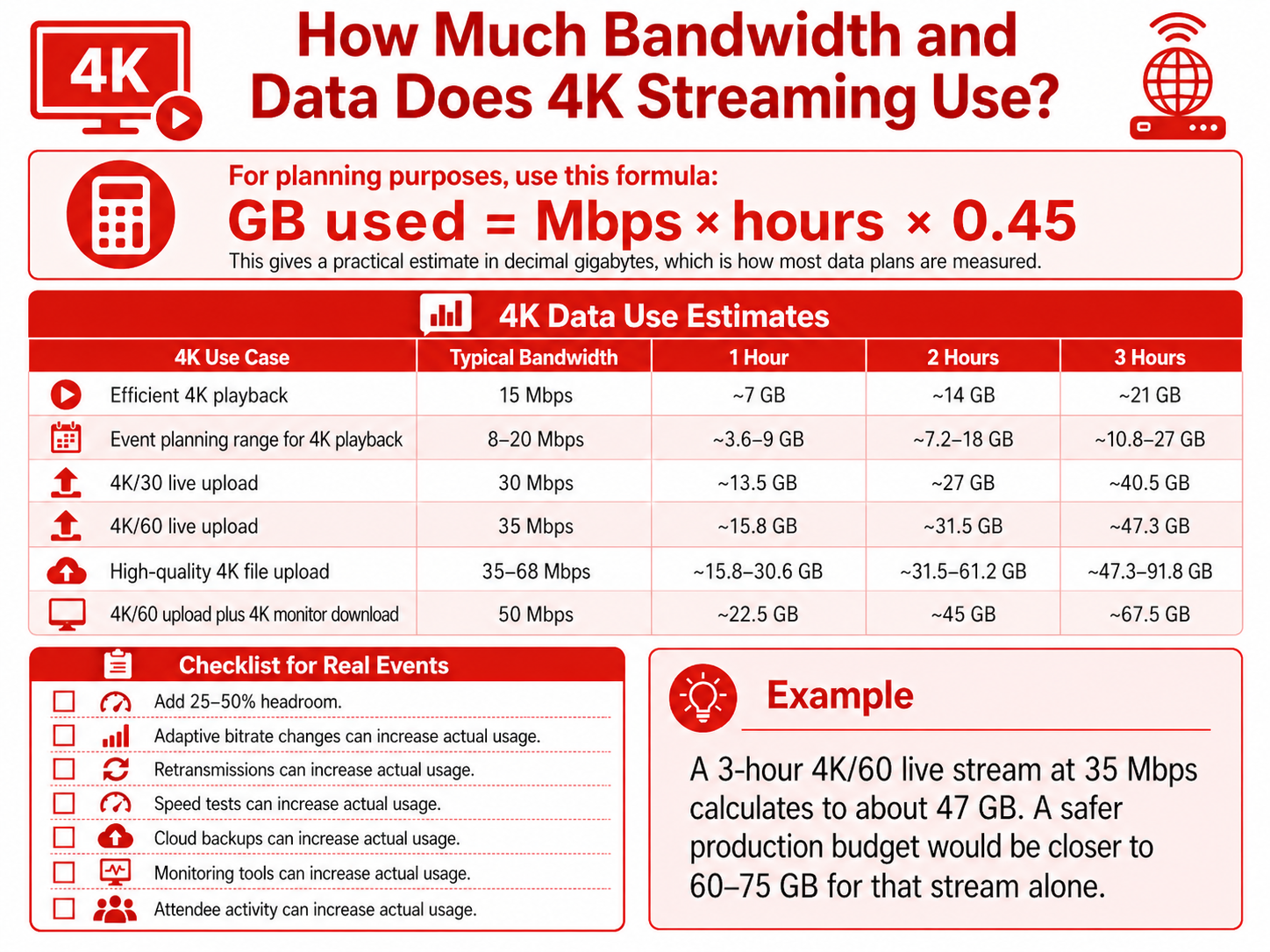
For events, add 25–50% headroom. Adaptive bitrate changes, retransmissions, speed tests, cloud backups, monitoring tools and attendee activity can all increase actual usage.
For example, a 3-hour 4K/60 live stream at 35 Mbps calculates to about 47 GB. A safer production budget would be closer to 60–75 GB for that stream alone.
If the venue does not have a reliable circuit already in place, Slice can help with Internet Hotspots & Rentals, Starlink rental, temporary bandwidth, cellular kits and portable network options depending on the size and type of event.
What would a practical event WiFi design look like?
Consider an event with:
One 4K/60 live stream upload at 35 Mbps
One 4K monitor download at 15 Mbps
A POS network requiring 15 Mbps down and 5 Mbps up
300 attendees
180 connected devices
45 active guest users at a time
Average guest usage of 2 Mbps per active user
Guest demand would be about 90 Mbps. Production would require about 50 Mbps combined. POS should have dedicated reserved capacity. After adding headroom, a practical minimum internet circuit might be around:
300 Mbps down / 150 Mbps up
For access points, the design may require 4–6 APs at minimum, but more may be needed depending on walls, floorplan, outdoor areas, booth layout, crowd density and interference. For high-density or large-area WiFi, AP placement and antenna selection matter as much as AP count.
That is why Slice starts with planning. Our wireless site survey and design process reviews coverage needs, existing networks, signal challenges, power, cabling, access point placement and monitoring requirements before deployment.
Why event WiFi needs separate networks
A good event network should not treat every device the same.
POS devices, registration scanners, production encoders, staff laptops, sponsor booths, VIP areas and general attendee traffic have different security and performance requirements. A professional event WiFi design may include:
Guest WiFi for attendees
POS network for vendors and payment systems
Production network for streaming, media and AV teams
Staff network for organizers and operations
Sponsor or exhibitor networks
VIP or press network
Back-of-house connectivity
Using VLANs, bandwidth controls, firewall rules, captive portals and monitoring tools, Slice can shape the user experience for each group. With WiSNET, networks can be segmented and managed with policies designed for security, performance, reporting and revenue opportunities.
WiFi 5, WiFi 6, WiFi 6E or WiFi 7: which is best for events?
The right WiFi generation depends on density, devices, applications and venue conditions.
WiFi 5 / 802.11ac can work for small events, vendor booths, POS systems, light guest access and basic social media use. It is less ideal for crowded spaces, heavy video uploads and high-density public WiFi.
WiFi 6 / 802.11ax is the preferred baseline for many event networks. It improves efficiency in busy environments and is better suited for attendee WiFi, staff networks, POS and moderate production requirements.
WiFi 6E adds access to the 6 GHz band where supported. This can provide cleaner spectrum and wider channels for newer devices. However, many POS devices and older phones may still rely on 2.4 GHz or 5 GHz, so the network still needs to support mixed device environments.
WiFi 7 / 802.11be is the strongest option for high-density venues, large production environments, multi-gigabit internet and future-ready deployments. It can offer higher throughput and lower latency, but the full benefit requires compatible clients, multi-gig switching, proper PoE and careful RF planning.
One important distinction: “4K-QAM” in WiFi 7 is a radio modulation term. It is not the same thing as 4K video.
For most professional event deployments, WiFi 6 or WiFi 6E should be considered the practical minimum. WiFi 7 is best for high-density, high-performance and future-facing networks. Slice’s WiFi and wireless Internet services are hardware-neutral and designed around the right technology for each site, not a one-size-fits-all kit.
What network equipment matters beyond the access points?
A reliable event WiFi network depends on the full infrastructure, not only the APs.
For professional temporary and permanent WiFi deployments, use managed enterprise-grade equipment, including:
PoE+ or PoE++ switches for powering modern access points
2.5G, 5G or 10G multi-gigabit switch ports for high-performance APs
10G SFP+ uplinks between switch stacks, IDFs, routers and production areas
VLAN support for separating guest, staff, POS, production and vendor traffic
QoS policies to prioritize live streaming, POS and operational traffic
Firewall rules and ACLs to control access between networks
Monitoring tools for client count, retries, channel utilization, WAN usage and device health
UPS power backup for routers, switches, controllers and critical APs
Outdoor-rated cabling and enclosures for tents, festivals and exposed areas
Unmanaged consumer switches should be avoided for critical event networks. They do not provide the visibility, segmentation, power control or troubleshooting tools required for professional wireless Internet service.
Slice’s Managed WiFi Services and WiSNET Hardware and Software support more than access points. They help event teams and venue operators plan for management, monitoring, reporting, cost recovery and long-term network performance.
Temporary event WiFi vs permanent venue WiFi
Some events need a one-time temporary network. Others happen inside venues that host productions every week.
For one-off events, pop-ups, outdoor activations, product launches and remote productions, Slice can provide temporary event WiFi, portable network service, temporary bandwidth, Starlink rental or cellular kits depending on the use case.
For venues, a more permanent solution can be better. Slice’s VenueNet and Event Spaces approach helps event spaces offer reliable connectivity without bringing in a new IT team for every booking. The network can be customized for different events, including guest access, staff networks, production requirements and sponsor or exhibitor needs.
When should events consider cost recovery WiFi?
Event WiFi is often treated as a cost. In many cases, it can also become a revenue or data asset.
With FREEMIUM™ WiFi, venues and event organizers can provide free basic WiFi while creating opportunities for premium access, advertising, sponsorship, branded captive portals, data capture and audience engagement.
Cost recovery models can be useful for:
Trade shows with exhibitor internet packages
Festivals with sponsor-branded WiFi
Venues offering premium bandwidth tiers
Events with vendor or production connectivity needs
Public WiFi networks that need long-term operational sustainability
Guest experiences that benefit from branded login, promotions or audience insights
The right model depends on the audience, venue, event type and privacy requirements. Slice can help design a network that supports both reliable access and practical revenue recovery.
Final takeaway: good event WiFi is designed, not guessed
4K streaming, POS, social media, staff operations and guest wireless Internet can all run successfully over WiFi when the network is engineered correctly.
For most events:
Use wired Ethernet for mission-critical 4K production whenever possible
Use WiFi 6 or WiFi 6E as the preferred baseline
Use WiFi 7 for high-density, multi-gig and future-ready deployments
Separate POS, production, staff, vendor and guest networks
Use managed PoE switches, VLANs, QoS, monitoring and backup power
Plan bandwidth and data usage with 25–50% headroom
Perform a wireless site survey or RF site survey before deployment
Consider a cost recovery network when vendors, sponsors or premium users need paid connectivity
Whether the need is temporary wireless Internet for events, managed WiFi for a permanent location, large-area WiFi, Starlink or hotspot rental, or a FREEMIUM™ cost recovery network, the best results come from professional planning, clean RF design, proper switching and active monitoring.
Need help planning WiFi for your next event or venue? Contact Slice Wireless Solutions to schedule a free assessment.