
WiFi Access Point Signal Patterns and Network Topologies: Choosing the Right Design for Reliable Wireless Internet
Reliable Wireless Internet is not simply a matter of installing the most powerful access points available. The way each WiFi access point sends and receives radio-frequency energy—and the way access points connect to the rest of the network—directly affects coverage, capacity, roaming, speed, and the overall user experience.
The right solution may involve omnidirectional access points, directional antennas, wired backhaul, wireless mesh, point-to-point bridges, or point-to-multipoint links. Each option solves a different type of coverage or connectivity problem.
Whether you are planning temporary WiFi for an event, a permanent business network through managed WiFi services, a WiFi revenue and cost-recovery network, or large-area coverage across a campus or public space, the design should begin with one question:
What coverage pattern and network topology does this location actually need?
A professional wireless site survey and network design process helps answer that question before equipment is purchased or installed.
When Should Omnidirectional WiFi Access Points Be Used?
Omnidirectional WiFi antennas provide coverage around the access point, usually across a 360-degree horizontal pattern. Many indoor access points with internal antennas are designed for ceiling installation and provide broad coverage throughout the surrounding area.
However, “omnidirectional” does not mean the signal forms a perfect sphere.
A typical omnidirectional antenna pattern is often compared to a donut: the signal is stronger around the sides of the antenna and weaker directly above and below it. As antenna gain increases, that donut may become flatter—more like a pancake. This can extend horizontal coverage, but it may also create weak areas beneath an access point mounted high above users.
Omnidirectional access points are commonly suited to:
Offices
Classrooms
Retail spaces
Hospitality environments
Apartment and residential buildings
Small businesses
General indoor WiFi coverage
Areas where users are distributed around the access point
For most permanent indoor deployments, multiple lower-power omnidirectional cells provide more predictable coverage and capacity than a small number of access points operating at maximum power.
Omnidirectional antennas may be less effective when access points must be mounted very high, coverage needs to be confined to one area, or signal leakage into neighboring floors, tenants, streets, or buildings must be reduced.
This is one reason access-point placement should be determined through an RF assessment rather than convenience alone. Slice’s site survey, design, installation, and monitoring process evaluates antenna placement alongside interference, cabling, power, capacity, and the physical layout of the property.
When Is a Directional WiFi Antenna the Better Choice?
Directional antennas focus RF energy toward a defined area instead of distributing it evenly in every direction. This can strengthen the desired signal, improve signal-to-noise ratio, and reduce unnecessary RF energy outside the intended coverage zone.
They are especially useful when the coverage area has a clear shape or boundary, such as:
A warehouse aisle
A long corridor
An outdoor patio
A parking lot
A loading dock
A courtyard
A pedestrian area
One side of a building
A defined guest zone at an event
Common directional antenna types include:
Patch antennas
Panel antennas
Sector antennas
Yagi antennas
Dish antennas
Grid antennas
Horn antennas
Directional antennas do not create additional transmit power. They concentrate and redirect the available RF energy. Antenna selection, aiming, mounting height, polarization, and orientation therefore have a major effect on performance.
Where Do Patch and Panel Antennas Work Best?
Patch and panel antennas are widely used for controlled indoor and outdoor WiFi coverage. They are typically flat, square, or rectangular, with most of the signal radiating outward from the front face.
Compared with antennas designed for narrow, long-distance links, patch and panel antennas generally produce a broader forward coverage area. This makes them useful when users occupy a defined zone rather than a single distant point.
Good applications include:
Warehouse aisles
Distribution centers
Long hallways
Outdoor dining areas
Courtyards
Parking facilities
Loading docks
Building-side coverage
Entry and registration areas
Vendor, sponsor, or hospitality zones at events
In a warehouse, for example, a directional antenna aimed along an aisle may provide better device-level coverage than a high-gain omnidirectional access point mounted far above the warehouse floor. Controlled antenna placement can help reduce reflections, minimize dead spots, and place RF energy closer to scanners, tablets, sensors, cameras, and other operational devices.
Warehouses are particularly challenging because racks, inventory, machinery, moving vehicles, high ceilings, and changing storage layouts all affect signal behavior. Slice’s warehouse WiFi solutions are designed around these environmental and operational challenges rather than a standard office-WiFi template.
Patch, panel, and sector antennas can also be used to shape large-area WiFi coverage around buildings, boardwalks, campuses, pedestrian spaces, outdoor seating areas, and temporary venues.
Is Beamforming the Same as Using a Directional Antenna?
No. Beamforming and directional antennas are related to signal direction, but they are not the same technology.
A directional antenna has a fixed physical radiation pattern. It sends and receives most effectively within the area toward which it is mounted and aimed.
Beamforming is an adaptive WiFi capability that uses multiple antenna elements and signal-processing techniques to improve communication toward compatible client devices. It is common in modern WiFi equipment and can work alongside technologies such as MIMO and MU-MIMO.
Beamforming can improve link quality and wireless efficiency, but it is not a substitute for good physical design. Its effectiveness depends on factors including:
Client-device capabilities
Channel conditions
Interference
Access-point placement
Antenna design
Network configuration
The number and distribution of connected users
Beamforming cannot correct an access point installed in the wrong location, mounted in the wrong orientation, or expected to cover an area beyond the limits of the selected antenna.
Modern equipment should therefore still be deployed as part of a professional wireless design and site survey.
When Does Mesh WiFi Make Sense?
Mesh is a network topology in which access points communicate with one another, often through wireless backhaul. Some mesh access points connect directly to the wired network, while others relay traffic through nearby access points.
Mesh can be useful when Ethernet cabling is unavailable, difficult to install, or impractical for a short-term deployment.
Possible mesh applications include:
Older buildings with limited cabling
Temporary event venues
Outdoor guest areas
Construction and staging areas
Moderate-throughput coverage extensions
Sites where trenching or new cable pathways are impractical
Rapidly deployed or changing environments
For event organizers, mesh may be one component of a larger temporary WiFi deployment, particularly where the network must be installed quickly around tents, stages, plazas, parking areas, or temporary structures.
Mesh must still be designed carefully. Wireless backhaul uses airtime that could otherwise serve client devices, and additional wireless hops can reduce available capacity or increase latency. Performance depends on the radios being used, channel availability, backhaul design, interference, and the amount of traffic crossing each link.
For high-density or business-critical Wireless Internet, wired backhaul is generally preferred whenever it can be installed safely and economically.
Mesh is a useful design option—not a universal substitute for structured cabling.
What Is a Point-to-Point WiFi Bridge?
A point-to-point wireless bridge connects two fixed locations over a dedicated wireless link. Each end usually uses a narrow directional antenna aimed at the other endpoint.
Point-to-point links can be used for:
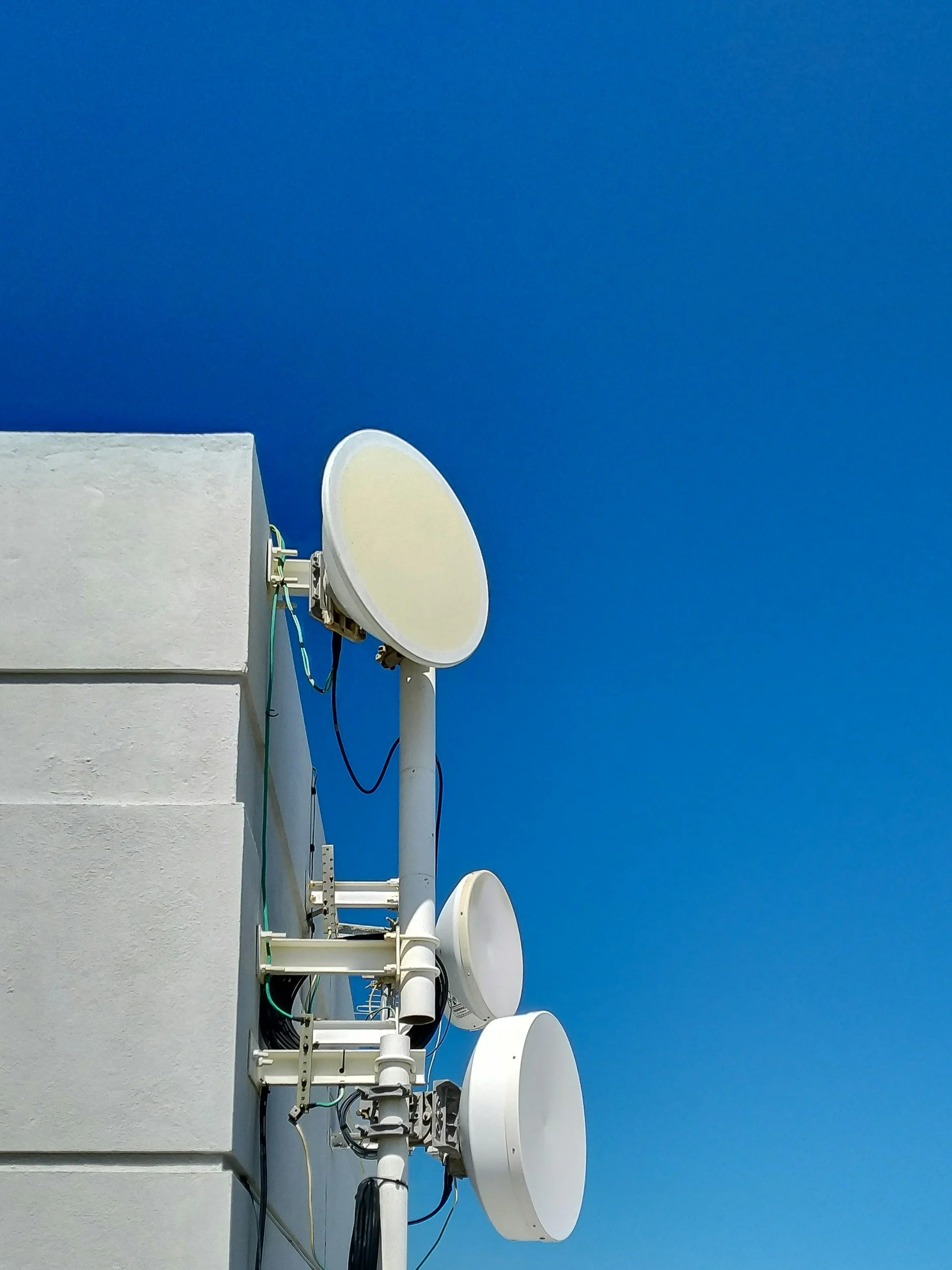
Connecting two buildings
Linking a warehouse to a main facility
Extending a network to a remote office
Connecting a gate, security station, or camera pole
Supporting temporary facilities
Providing network backhaul to an outdoor area
Avoiding a costly or delayed fiber installation
A point-to-point bridge is not the same as normal client WiFi.
Phones, laptops, tablets, scanners, and other user devices should not be expected to connect directly over a long-distance outdoor bridge. Instead, the bridge carries network traffic between the two locations. A normal indoor or outdoor WiFi access point then provides local coverage at the remote endpoint.
A properly engineered bridge typically requires:
Clear line of sight
Adequate Fresnel-zone clearance
Appropriate antenna gain
Stable mounting
Accurate alignment
Correct mounting height
Weather-resistant equipment
Surge protection and grounding
Local spectrum analysis
Sufficient backhaul capacity
Trees, structures, vehicles, seasonal foliage, construction, and even an apparently minor obstruction can affect link performance. A site assessment should evaluate the full path rather than simply confirming that one rooftop is visible from another.
What Is Point-to-Multipoint WiFi?
A point-to-multipoint network uses one central access point or base station to connect several remote stations.
The central base may use an omnidirectional antenna for relatively small 360-degree coverage or one or more sector antennas for greater control and capacity. Remote stations usually use directional antennas aimed toward the base.
Point-to-multipoint designs are often used for:
Campuses
Farms
Industrial facilities
Utility yards
Outdoor surveillance systems
Multi-building properties
Warehouses and outbuildings
Municipal or public-space networks
Wireless Internet service deployments
The primary limitation is shared airtime. Remote stations connected to the same base share the available channel capacity. As the number of locations and users increases, the design must account for aggregate throughput rather than evaluating each remote link separately.
Hidden-node conditions may also occur when remote stations can communicate with the base but cannot hear one another. For larger deployments, sectorization, channel reuse, interference management, capacity modeling, and traffic prioritization become essential.
How Does the Topology Affect Network Management?
Choosing an RF pattern is only part of the design. The network must also be monitored and managed after installation.
A permanent or large-area network may contain indoor access points, outdoor access points, point-to-point bridges, mesh links, gateways, sensors, private networks, and public guest access. Without centralized visibility, identifying a weak link or overloaded area can become difficult.
Slice’s WiSNET™ wireless management platform provides centralized network visibility, policy control, performance information, traffic management, and tools for managing different users, devices, and network segments.
Centralized management is particularly valuable when the network supports several different functions, such as:
Public guest WiFi
Staff communications
Point-of-sale systems
Security cameras
Ticketing and scanning
Building or IoT devices
Vendors and temporary tenants
Premium or sponsored connectivity
The physical topology determines how traffic moves. The management architecture determines how effectively that traffic can be monitored, secured, prioritized, and supported.
What Are the Most Common WiFi Design Mistakes?
Assuming Higher Antenna Gain Is Always Better
Higher-gain antennas reshape the coverage pattern. An antenna may extend a signal farther in one direction while creating weaker areas elsewhere. Gain should be selected for the required coverage shape—not treated as a universal performance upgrade.
Using Mesh Where Cabling Is Needed
Mesh is useful when cabling is impractical, but wireless backhaul consumes airtime. High-capacity and operationally critical areas should use wired backhaul whenever feasible.
Ignoring the Client Device
WiFi is a two-way connection. An access point may be capable of transmitting over a long distance, but the phone, tablet, laptop, scanner, or sensor must still be able to transmit back.
Coverage should therefore be designed around realistic client capabilities rather than access-point power alone.
Mounting Access Points in the Wrong Orientation
Ceiling access points, wall-mounted access points, outdoor units, and directional antennas have specific radiation patterns. Installing equipment in an orientation for which it was not designed can create unexpected dead zones or send RF energy into the wrong area.
Treating Wireless Bridges Like Normal WiFi
Point-to-point and point-to-multipoint links require accurate aiming, line-of-sight analysis, Fresnel-zone planning, spectrum evaluation, and stable mounting. They should not be planned as oversized versions of normal guest WiFi.
Designing for Coverage but Not Capacity
A strong signal does not guarantee a fast network. One access point may technically cover a large area but still be unable to serve the number of users and devices present.
Events, public spaces, warehouses, airports, campuses, and hospitality environments must be designed around device density, application use, peak traffic, and operational importance.
Skipping the RF Site Survey
Without a site survey, access points are often placed where installation is easiest rather than where wireless performance will be strongest.
That can lead to:
Too many or too few access points
Co-channel interference
Coverage gaps
Poor roaming
Unnecessary signal leakage
Insufficient backhaul
Expensive post-installation corrections
Slice’s wireless project process covers the site survey, design plan, installation or upgrade, system testing, monitoring, and potential cost-recovery opportunities.
Choosing the Right WiFi Design
There is no single antenna pattern or topology that works for every location.
Use omnidirectional access points for broad local coverage where users are distributed around the AP. Use patch, panel, or sector antennas when coverage must be directed toward a defined area. Use narrow directional antennas for fixed wireless bridges. Use mesh where cabling is impractical and the capacity trade-offs are acceptable. Use point-to-point or point-to-multipoint systems when the network must be extended between buildings or across a large property.
Most importantly, design for the users, devices, applications, and physical environment—not simply for the maximum advertised range of the equipment.
Final Takeaway
Strong Wireless Internet begins with the right signal pattern, topology, backhaul, and management plan.
A professional RF site survey helps determine how the signal will behave before installation begins. It identifies where access points and antennas should be placed, what type of topology is appropriate, how much capacity is needed, and where interference or physical obstacles may create problems.
Planning first helps prevent overbuilding, underbuilding, poor roaming, weak backhaul, and costly redesigns later.
Contact Slice Wireless Solutions to schedule a wireless assessment or discuss the right WiFi design for your building, warehouse, campus, outdoor property, or upcoming event.